Bitfocus Companion control
Drive the whole timer from a Stream Deck. Hakol Timer ships a ready-made Companion
module and installs it for you automatically — no config files to copy. You get stock
buttons (GO, pause, reset, set-time, and combined time-plus-action buttons), live
variables for the time, state and display mode, and button colours that follow the
countdown from green to red.
NDI output
Send the timer as a clean video source straight into Resolume Arena, vMix, OBS or any
NDI-ready system on the same network — no capture card, no cables. Resolution and frame
rate are configurable, and an optional alpha channel lets you key the timer over your
own content.
Virtual output window
A dedicated, borderless full-screen timer you can drag onto the stage screen, a
projector, or a capture device. It locks to a clean 16:9 and shows exactly what the
audience or speaker should see — the countdown and nothing else.
LAN web viewer
Open one web address on any phone, tablet, laptop or smart display on the network and it
shows the live timer instantly — no app to install. Perfect for the speaker's
confidence monitor, the stage manager or a green room, all updating in real time over
the local network.
Five timer styles & colour zones
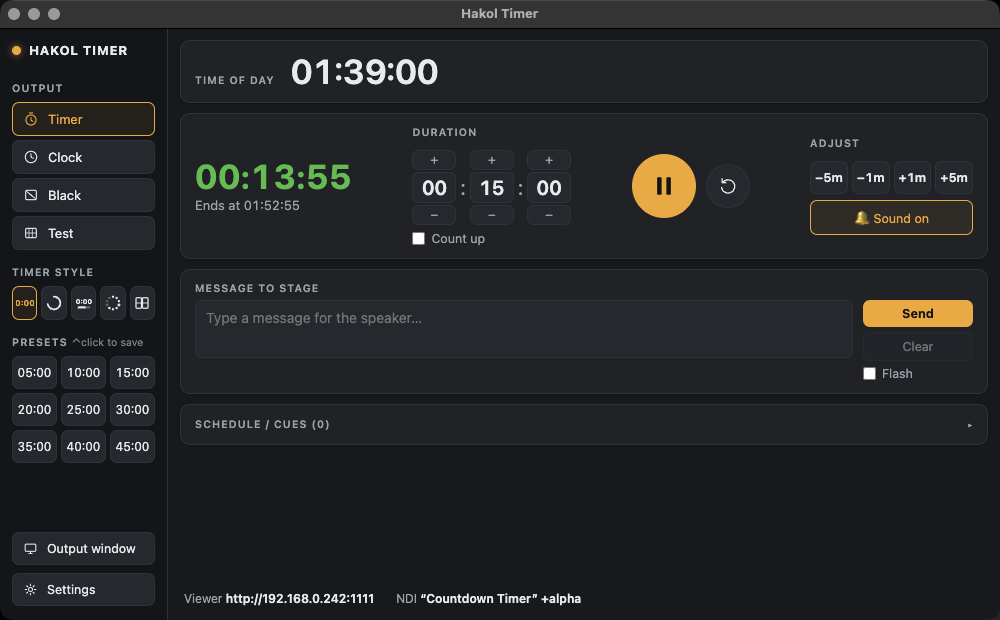
Choose how the countdown looks: big digits, a progress ring, a bar, dots, or a flip
clock. Colour thresholds turn it green, then orange, then red as time runs low, and it
keeps counting into overtime in red — so nobody misses an overrun. It also shows the
wall-clock time the timer will end at.
Message to stage
Type a note to the presenter — "wrap up", "louder", "go to Q&A" — and it appears on
their screen over the timer. Send it steady, or make it flash to grab attention, and
clear it again in one tap.
Schedule & run of show
Build your whole show as a list of cues — each with a title and duration — and step
through them with next, previous, or GO (load-and-start). Import the run of show from a
plain text file or JSON, so a thirty-item conference schedule is ready in seconds.
Instant, precise control
Nine one-tap duration presets, live −1 / −5 and +1 / +5 minute adjust, reset, and a
count-up mode. Change a running timer on the fly, or queue the next segment's length
without disturbing what's on screen. Everything is also controllable over OSC for
deeper show-control setups.
Sound, clock & branding
An end-of-timer sound plays through the audio output you pick, with an optional warning
beep before the end. Add your company logo to the display, show a live time-of-day
clock, and switch the whole output to black or a test pattern in a click.